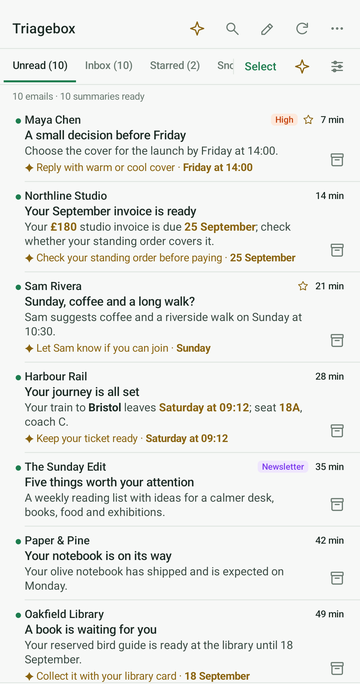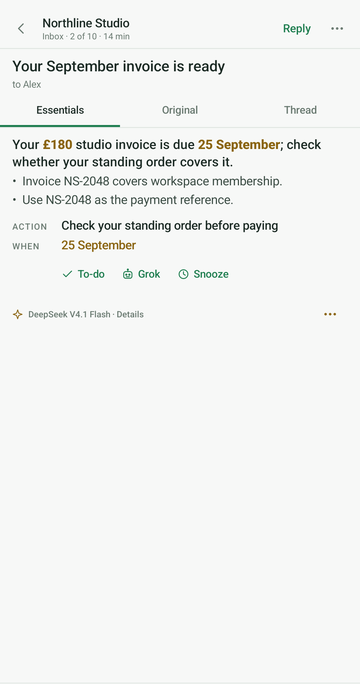
See what matters
Unread counts, search, sender sorting and optional relevance scores turn a noisy inbox into a queue.
Clear Gmail without living in Gmail
Turn your inbox into a short, actionable queue. Archive, snooze, unsubscribe and reply from a focused Chrome popup — with optional AI summaries on your own key.
Free on the Chrome Web Store · no account · data stays in your browser
Unread counts, search, sender sorting and optional relevance scores turn a noisy inbox into a queue.
Archive, snooze, label, unsubscribe, reply or remove a thread without opening another Gmail tab.
AI is optional, keys stay on your device, and every Google permission is granted by you.
Private by design
One extension, one workflow
Use the basic triage tools with no AI key, then add summaries only if they earn their place.
Unread badge, thread list, archive, snooze, labels, mark read/unread, spam, trash — on your account only.
Optional risk / phishing scoring on messages you choose to analyse, to help you spot scams faster.
Optional agenda view and event actions using Google Calendar scopes you approve.
Summaries and scores only when you supply a Gemini and/or xAI key and trigger a feature. A key is not a subscription — a Gemini key is created in a minute in Google AI Studio on an ordinary Google account, with no billing attached.
Built in public
Recent shipping from the product. Chrome Web Store is on 1.23.48 (updated 9 Aug 2026). Full history lives in the extension under Docs → Changelog.
Want the full engineering log? Open the extension → Docs → Changelog.
Your inbox, back under control
Free to install. No TriageBox account and no developer-operated data server.
Quick answers
Yes. Free to install on the Chrome Web Store — no subscription and no TriageBox account. Optional support never unlocks features.
No. There is no developer-operated backend. Processing runs in your browser; your Gmail data is not sent to the publisher.
No. Triage, sweeps, unsubscribe and the no-key scam checks work without one. Summaries and AI scores are optional if you add a Gemini and/or xAI key.
Not as a notifier — Checker Plus remains stronger there. TriageBox is built to clear the pile. Honest comparison.
Individuals who want a focused inbox workbench for their own Google account. It is not a bulk-mail tool, not a marketing platform, and not intended to access other people’s mailboxes.
Google sign-in uses OAuth via Chrome’s identity APIs. You grant access on Google’s consent screen. You can revoke access at any time at myaccount.google.com/permissions. Uninstalling the extension removes local data stored by the app.
TriageBox AI Gmail Checker is an independent tool. It is not affiliated with, sponsored by or endorsed by Google, and it is not a Google product. It works with a Google account you already have, using Google’s public APIs under their own terms, with your OAuth consent. Gmail, Google Calendar, Google and Chrome are trademarks of Google LLC; xAI and Grok are trademarks of X.AI Corp. X is a trademark of X Corp. Any other product name used in the extension or on this site belongs to its owner and is used only to identify the product being referred to.
Publisher: Paul Faisant · paulfaisant@gmail.com
This site is the official homepage for TriageBox AI Gmail Checker, the same application name used on the Google OAuth consent screen and related store listings.