
Chrome Web Store 2.02 · Gmail, in your browser
Peek a Gmail thread. Leave it unread.
TriageBox 2.02’s card more menu offers Keep unread when the thread is unread or you are on the Unread tab — tip: leave this conversation unread in Gmail so you can peek without clearing the Unread tab. Same Gmail write as Mark unread, but the card stays put. No AI key. No TriageBox server.
This is not snooze until reply, waiting for reply, spam review, or a phishing checker.
Free on the Chrome Web Store · no account · desktop Chrome only
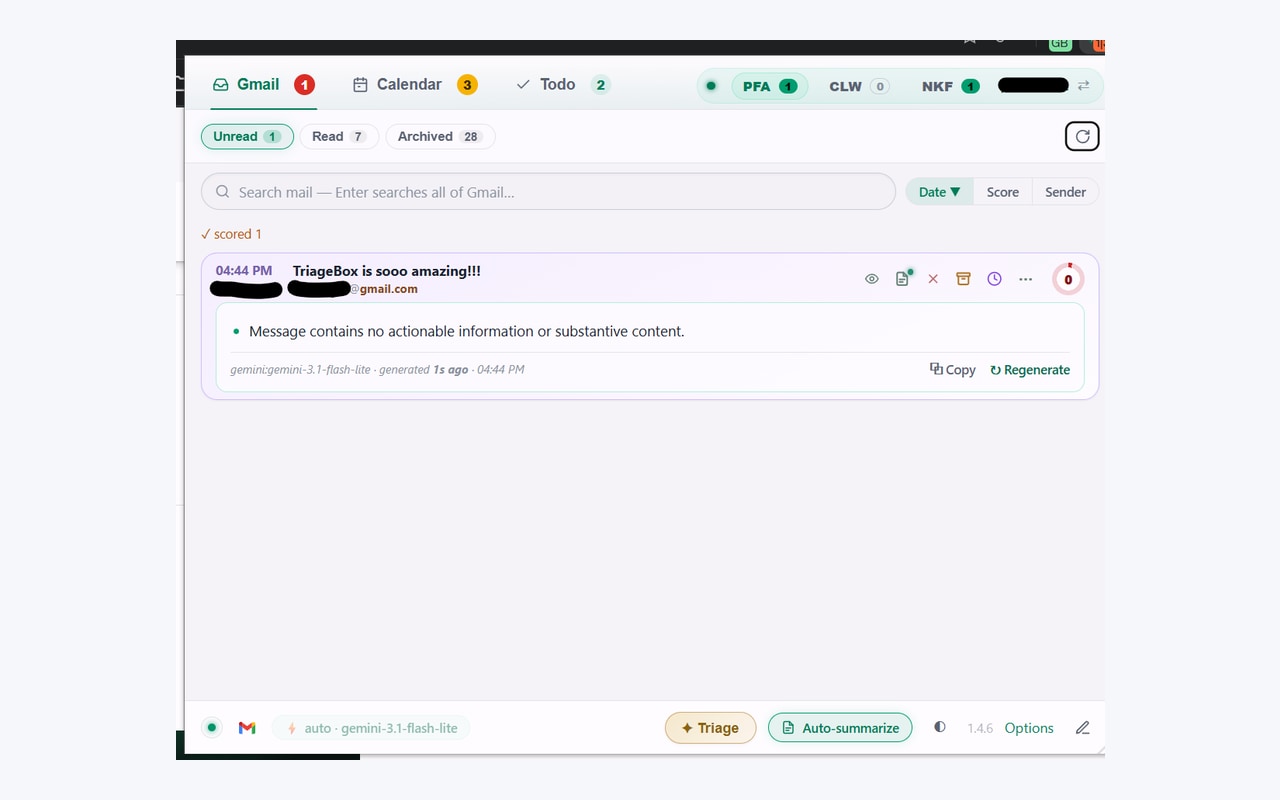
Gmail marks opened mail read
Use Gmail if opening the thread is fine. Use TriageBox if you need to peek in the popup and stay on Unread.
Gmail’s Unread label is free and correct. Opening a conversation in gmail.com usually marks it read. TriageBox 2.02 is the narrower job: open a card in the Chrome popup, then Keep unread so Gmail still treats the conversation as unread and the Unread tab does not lose it. First-time install still shows Google’s unverified-app screen.
Same mailbox, different job
Gmail unread vs TriageBox 2.02 Keep unread
Facts from Gmail’s unread behaviour and from the live Chrome Web Store listing for TriageBox 2.02. No invented ratings.
| What you need | Gmail | TriageBox 2.02 |
|---|---|---|
| Peek without clearing Unread | Open carefully / Mark as unread after | Keep unread on the card more menu — tip matches the product |
| Same write, card stays | Mark as unread moves focus in the web UI | Same Gmail unread write; card stays put; no unread-estimate bump if already unread |
| Restore unread from Read | Mark as unread | On the Read tab the menu shows Mark unread instead |
| Copy the full thread | Select / forward | Related: Copy all content on the same more menu (headers and body) |
| Hide until later / wake on reply | Snooze | That is snooze until reply — different page |
| On your phone | Gmail app | Desktop Chrome only |
TriageBox is not affiliated with Google. Gmail, Google and Chrome are trademarks of Google LLC. Keep unread does not snooze, archive, or empty spam. There is no TriageBox server and no AI key for this path.
Store 2.02 · no API key
How Keep unread actually runs
- Install and connect Gmail. Desktop Chrome. No TriageBox account.
- Open an unread card (or stay on the Unread tab). Peek the thread in the popup.
- More menu → Keep unread. Tip: leave this conversation unread in Gmail — peek without clearing the Unread tab.
- Card stays. Same Gmail write as Mark unread. If it was already unread, the unread estimate is not bumped. On the Read tab you get Mark unread instead.
Unread stays unread
Peek in the extension without wiping the Unread tab the way opening gmail.com often does.
Card stays put
Not a hide-and-restore dance. Same write as Mark unread; the row does not vanish.
Copy all content nearby
Same more menu can copy the full conversation — related, not the primary job of this page.
Not snooze or spam
Snooze until reply, waiting for reply, and spam review are different pages.
Peek first. Stay on Unread.
Open the card. Keep unread. The conversation stays in Gmail’s unread set.
Chrome Web Store 2.02. No TriageBox account. Data stays in your browser.
Limits, stated
What this page does not claim
- It does not replace Gmail’s Mark as unread. That still works, for free, with no extension.
- It does not hide the thread until a reply. That is snooze until reply.
- It does not list sent mail waiting on an answer. That is waiting for reply.
- It does not review or empty Spam. That is Gmail spam review.
- It does not check SPF/DKIM on the card. That is Gmail phishing checker.
- It does not require an AI key or a TriageBox server.
- It does not run on your phone — desktop Chrome only.
- It is not for anyone else’s mailbox.
Quick answers
Keep Gmail unread
How do I keep a Gmail conversation unread after opening it in an extension popup?
Gmail marks a thread read when you open it in gmail.com. TriageBox 2.02 is a Chrome extension: on an unread card (or any card on the Unread tab), open the more menu and choose Keep unread. That leaves the conversation unread in Gmail so you can peek without clearing the Unread tab. The card stays in place. No AI key. No TriageBox server. Desktop Chrome only.
What is the difference between Keep unread and Mark unread?
Both use the same Gmail write that marks the thread unread. Keep unread appears when the thread is already unread or you are on the Unread tab: the card stays put and the unread estimate is not bumped if it was already unread. On the Read tab the menu shows Mark unread instead, which restores unread and moves the card accordingly.
Is this the same as snooze or waiting for reply?
No. Keep unread only leaves the conversation unread so peeking does not clear Unread. Use snooze until reply to hide until an answer, waiting for reply for sent threads with no answer, spam review for the Spam folder, and Gmail phishing checker for sender checks.
Does my mail go through a TriageBox server?
No. There is no developer-operated backend. Processing runs in your browser; Gmail data is not sent to the publisher.
Desktop Chrome · Gmail you already have
Peek without clearing Unread. Keep unread on the card menu.
Free to install. No subscription. No TriageBox account.